

Insert_recordset with outer join – Column does not allow nulls in AX 2012

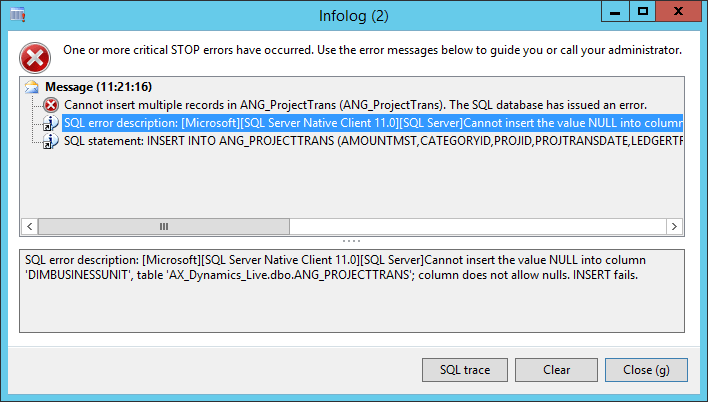
Cannot insert multiple records. The SQL database has issued an error. Cannot insert the value NULL into column ‘ ‘, table ‘ ‘; column does not allow nulls. INSERT fails.
It is thrown when no corresponding record is found in outer joined table and thus null value is fetched and tried to be inserted into Dynamics AX table column. As Dynamics AX table structure does not allow nulls (providing constraints for adding default values for columns), SQL statement: INSERT INTO … SELECT … containing null values simply cannot be executed successfully.
Luckily, there is a way to avoid such behaviour in your application. Below I present sample requirement and steps to follow.
Scenario
We have to prepare data for a report showing project transactions. As there can be millions of source records we decide to use bulk commands to populate the output table. This table is populated each night by a scheduled batch job. Values are taken from tables ProjTransPosting (Ledger updates) and ProjCostTrans (Expense transactions) and view DimensionAttributeValueSetItemView (Dimension code set value – Business Unit).
Piece of code we start with:
ANG_ProjectTrans trans;
ProjTransPosting projTransPosting;
ProjCostTrans projCostTrans;
DimensionAttributeValueSetItemView dimBU;
DimensionAttribute dimAttrBU;
delete_from trans;
select firstOnly RecId
from dimAttrBU
where dimAttrBU.Name == ‘BusinessUnit‘;
insert_recordset trans (
AmountMst
, CategoryId
, ProjId
, ProjTransDate
, LedgerTransDate
, Voucher
, DefaultDimension
, Txt
, DimBusinessUnit
)
select
AmountMst
, CategoryId
, ProjId
, ProjTransDate
, LedgerTransDate
, Voucher
from projTransPosting
join
DefaultDimension
, Txt
from projCostTrans
where projCostTrans.TransId == projTransPosting.TransId
outer join
DisplayValue
from dimBU
where projCostTrans.DefaultDimension == dimBU.DimensionAttributeValueSet
&& dimBU.DimensionAttribute == dimAttrBU.RecId;
Unfortunately, we run into critical STOP error:
Cannot insert multiple records in ANG_ProjectTrans (ANG_ProjectTrans). The SQL database has issued an error.
Solution
Use insert_recordset with inner joins only. Then update the data using update_recordset and required joins that were omitted in initial insert_recordset command:
insert_recordset trans (
AmountMst
, CategoryId
, ProjId
, ProjTransDate
, LedgerTransDate
, Voucher
, DefaultDimension
, Txt
)
select
AmountMst
, CategoryId
, ProjId
, ProjTransDate
, LedgerTransDate
, Voucher
from projTransPosting
join
DefaultDimension
, Txt
from projCostTrans
where projCostTrans.TransId == projTransPosting.TransId;
update_recordSet trans
setting DimBusinessUnit = dimBU.DisplayValue
join DisplayValue from dimBU
where trans.DefaultDimension == dimBU.DimensionAttributeValueSet
&& dimBU.DimensionAttribute == dimAttrBU.RecId;
When updating data you can use outer joins as well, especially if you want to proceed with other dimensions:
update_recordSet trans
setting DimBusinessUnit = dimBU.DisplayValue
, DimCostCenter = dimCC.DisplayValue
, DimDepartment = dimDep.DisplayValue
outer join DisplayValue from dimBU
where trans.DefaultDimension == dimBU.DimensionAttributeValueSet
&& dimBU.DimensionAttribute == dimAttrBU.RecId
outer join DisplayValue from dimCC
where trans.DefaultDimension == dimCC.DimensionAttributeValueSet
&& dimCC.DimensionAttribute == dimAttrCC.RecId
outer join DisplayValue from dimDep
where trans.DefaultDimension == dimDep.DimensionAttributeValueSet
&& dimDep.DimensionAttribute == dimAttrDep.RecId;




Porozmawiajmy o Twoim projekcie
Napisz, z czym przychodzisz: wdrożenie, migracja, rozwój systemu albo pytanie, na które szukasz odpowiedzi. Wracamy z konkretną propozycją następnego kroku, nie z prezentacją handlową.




