

Basics of working with date effective framework in AX 2012 – Part 1

In the first part of blog I am going to introduce implementation of the framework and in the second part - describe basics about maintaining the data with it. For more examples and detailed description I refer to MSDN from which you can download white paper https://technet.microsoft.com/en-us/library/hh335187.aspx↗.
If we want to use data effective table in our database design, here are the steps we need to follow in order to make it happen.
For a new created table that we want to be a date effective one, first we have to decide about granularity for ValidFrom and ValidTo fields in which will be stored an information about date.
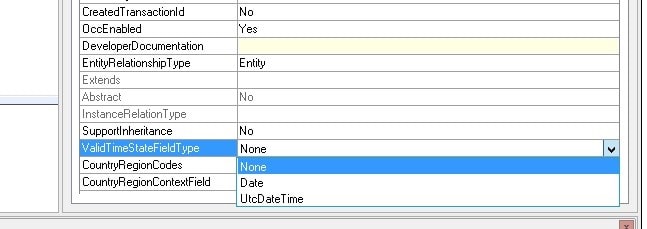
We can choose between Date and UtcDateTime options. Choice depends on our needs. If we want effectiveness of a record at the same UTC time all over the world we are selecting UtcDateTime. If we want record to be effective on a certain date no matter on current location of a customer we are choosing Date.
After this step ValidFrom and ValidTo fields will appear in our table with a type reflecting our choice – Date type for Date and DateTime type for UtcDateTime
Second thing that we have to do is set up an index on the table. In its properties we are setting as you can see in picture below. Before setting ValidTimeStateKey property, put ValidFrom field inside index.
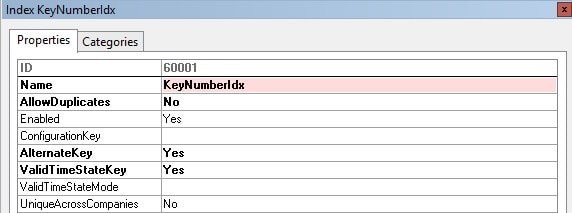
In addition we have to decide if we want to allow date gaps in our data. For instance we might want to track employee assignment over time, then it is logical to allow gaps in dates because worker can be unassigned for some time. But on the other hand we can have an "unassigned" as one of possible statuses for our worker. Then we don't want to allow gaps to be able to follow date continuum. Based on that choice we are setting ValidTimeStateMode property on the index. After this setup ValidTo should appear in our index fields list. Best practice is to select Yes from Included Column list on properties tab.
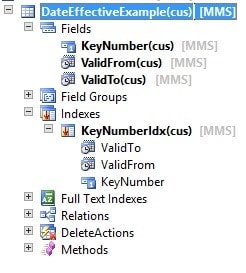
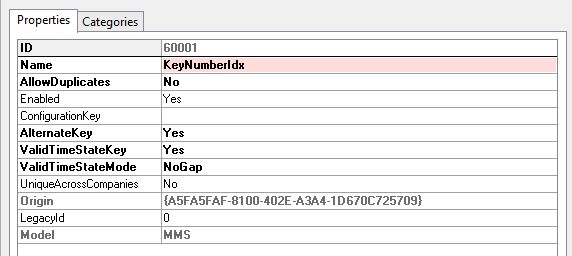
It is recommended to not set Configuration keys on any of the ValidTimeStateKey columns.
By default you can't set them on ValidFrom and ValidTo fields.
Remember to set new created Index as a ReplacementKey in table properties.
And that's it, our table is ready to track the data!
Value information can be also that date effective framework is integrated with table inheritance functionality but each property we set in order to achieve date effectiveness has to be set on the root table.
See more

AGA pomaga – poznaj inteligentnego asystenta do przetwarzania zapytań ofertowych: ANEGIS Generative Assistant


Jak z pomocą narzędzi Power Platform, Microsoft Fabric i AI zrealizować plan na cyfrową transformację? ANEGIS Power Center

Obowiązkowy KSeF startuje za 4 miesiące! Umów się na bezpłatne konsultacje i przygotuj swój system na zmiany
Let's talk about your project
Let us know what you need: implementation, migration, system development, or a question you’re looking to have answered. We’ll get back to you with a concrete proposal for the next step - not a sales pitch.




