

D365 new features – No-code form customisation

1. When you click on Personalize this form in the Options ribbon, you will find in the toolbar that the ‘+’ has been replaced by ‘Insert’.
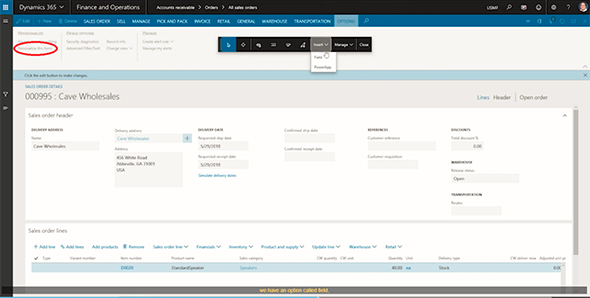
2. Click Field and then click in the pane where we want to add a new field. We will add a field in the Sales order header. As before, the Insert fields side panel opens, but now there is the option available to + Create new field.

3. We need to complete the details, add a Label name, and a tool-tip description if required. The standard types are available to choose for the type of field.

4. Confirm the customisation.
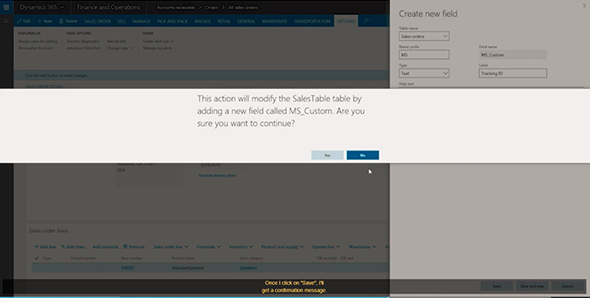
5. The newly created field will appear at the top of the list of available fields. Click Insert, and after refreshing the page, the new field is ready to be used.

This ability to add user-defined fields is one of the new features Microsoft is adding to Dynamics 365 Finance and Operations to make it more flexible and customisable for power users without the need of coding.
See more

AGA pomaga – poznaj inteligentnego asystenta do przetwarzania zapytań ofertowych: ANEGIS Generative Assistant


Jak z pomocą narzędzi Power Platform, Microsoft Fabric i AI zrealizować plan na cyfrową transformację? ANEGIS Power Center

Obowiązkowy KSeF startuje za 4 miesiące! Umów się na bezpłatne konsultacje i przygotuj swój system na zmiany
Let's talk about your project
Let us know what you need: implementation, migration, system development, or a question you’re looking to have answered. We’ll get back to you with a concrete proposal for the next step - not a sales pitch.




