

Data migration tool in AX 2012

To use EDT relation migration tool with Dynamics AX 2012 we need to go into:
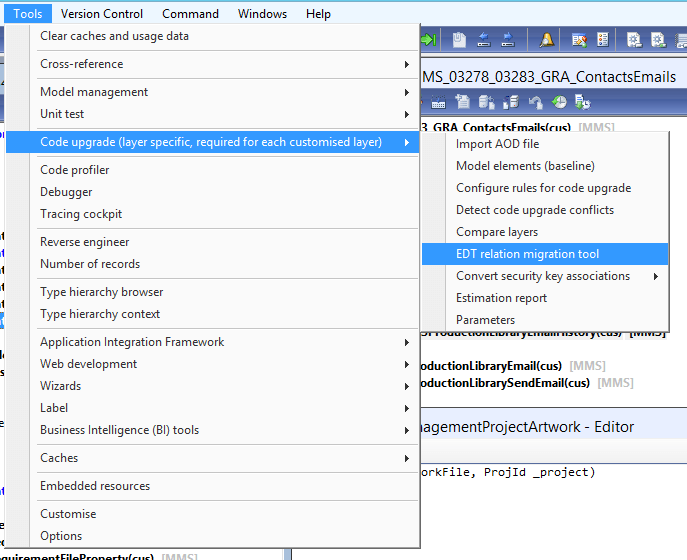
Before we start migrating it’s good to do refresh relation data:

This might take couple of minutes but we will have latest data, especially if the table is new the tool might not pick it up.
In me scenario I have new table to which I have added ProjId and SalesId and even thou adding SalesId prompt for EDT relation I still got the migration error:


When data is successfully refreshed we can search for the table that showed the error. We can see now that fields we added under “Migration status” have “Not migrated” we need to change “Migration action” from Skip to Migrate(or Mark as ignore EDT relation).

Now we just need to click on “Migrate single table” and our EDT relations will be updated, in our case we already had relation for SalesId and migration tool noticed this and instead of creating new simply updated old relation. Now when we compile we will see that both errors disappeared meaning the relations were migrated, in this scenario the table didn’t need new relations but sometimes after this process we will see that migration tool automatically added relations for specific EDT.
See more

AGA pomaga – poznaj inteligentnego asystenta do przetwarzania zapytań ofertowych: ANEGIS Generative Assistant


Jak z pomocą narzędzi Power Platform, Microsoft Fabric i AI zrealizować plan na cyfrową transformację? ANEGIS Power Center

Obowiązkowy KSeF startuje za 4 miesiące! Umów się na bezpłatne konsultacje i przygotuj swój system na zmiany
Let's talk about your project
Let us know what you need: implementation, migration, system development, or a question you’re looking to have answered. We’ll get back to you with a concrete proposal for the next step - not a sales pitch.




