

Import CSV File: AIF method – Part 3

First go to the System administration -> Setup -> Services and Application Integration Framework -> Inbound ports:
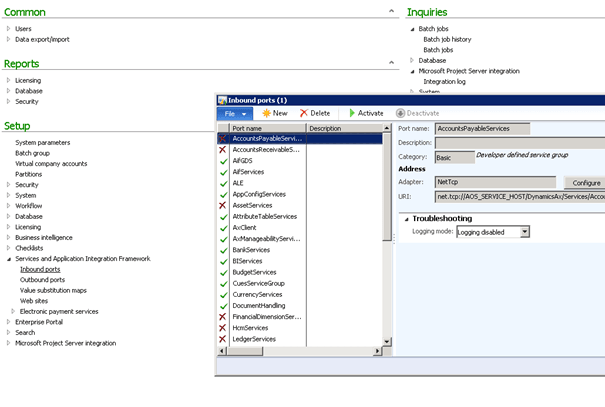
Click on New and create new inbound port, lets name it for example AttributeTableServices.
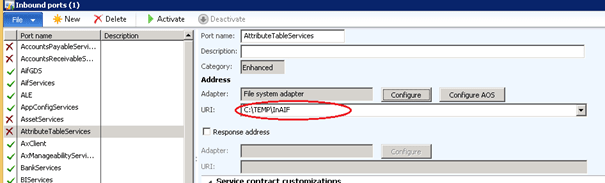
First we need to set Adapter to File system adapter and specify the URL which in our case is the folder to where you will drop your CSV files. Then click the Configure button and select Admin:
Then in Service contract customizations select Service operations and find AttributeTableConfigService.create in Remaining service operations and select it by clicking ‘<‘:

Next step is to check the Transform all request checkbox and load the dll for our transform (follow the red arrows J).

Remember that every time we modify that dll we need to change its version in Visual Studio:

Click button Activate:

Testing
First drop the CSV file into the URI directory. After execution it will disappear because it will be consumed by the service, so every time we want to test the execution we need to add a new file into the folder. Approach: Execute this following job:
static void AifProcessor(Args _args)
{
AifGatewayReceiveService agrs = new AifGatewayReceiveService( );
AifInboundProcessingService aip = new AifInboundProcessingService( );
AifGatewaySendService agss = new AifFatewaySendService( );
AifOutboundProcessingService aop = new AifOutboundProcessingService( );
agrs.run( );
aip.run( );
agss.run( );
aop.run( );
}
Run job
Check AttributeTable, you should see changes!
Approach: Create batch job:
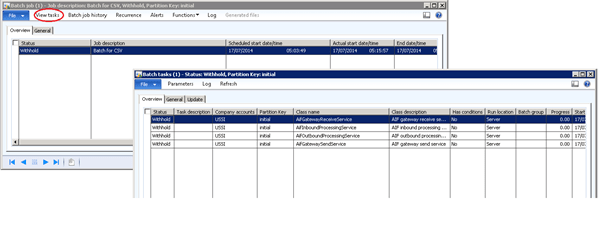
System administration -> Inquiries -> Batch jobs -> Batch jobs
- Add new batch job (Ctrl + N).
- Click on View tasks and add new tasks (Ctrl + N) in the given above order.
- Change status to waiting and wait for the execution.
When status changes to Ended check AttributeTable, you should see changes!
See more

AGA pomaga – poznaj inteligentnego asystenta do przetwarzania zapytań ofertowych: ANEGIS Generative Assistant


Jak z pomocą narzędzi Power Platform, Microsoft Fabric i AI zrealizować plan na cyfrową transformację? ANEGIS Power Center

Obowiązkowy KSeF startuje za 4 miesiące! Umów się na bezpłatne konsultacje i przygotuj swój system na zmiany
Let's talk about your project
Let us know what you need: implementation, migration, system development, or a question you’re looking to have answered. We’ll get back to you with a concrete proposal for the next step - not a sales pitch.




