
Read XML file from URL in AX 2012

I hope that after this short presentation you will understand how it works and how to implement this functionality in your future projects.
Below there is an example of XML file:
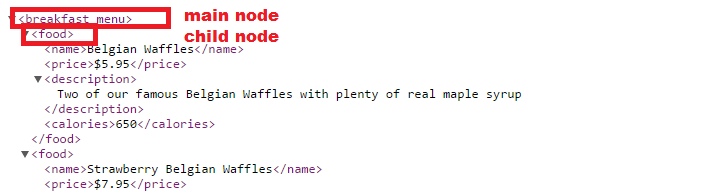
For this purpose I’ve wrote a short Job to display data on a screen:
static void ReadFromXMLfile(Args _args)
{
System.Net.WebResponse webResponse;
System.Net.HttpWebRequest httpWebRequest;
System.Net.WebHeaderCollection webHeaderCollection;
System.IO.StreamReader streamReader;
System.IO.Stream stream;
str xmlOut;
XmlDocument xmlDocument;
XmlNodeList xmlNodeList;
XmlNode mainNode;
XmlNode childNode;
#define.ServiceTimeout(5000)
#define.ServiceURL('http://www.w3schools.com/xml/simple.xml')
#define.mainNodeName('breakfast_menu')
#define.childNodeName('food')
#define.nameNode('name')
#define.priceNode('price')
#define.descriptionNode('description')
#define.caloriesNode('calories')
#define.HttpWebRequestMethod("GET")
#define.HttpWebRequestContentType("application/xml")
#define.HttpHeaderAuthorization("Authorization")
httpWebRequest = System.Net.WebRequest::CreateHttp(#ServiceURL);
httpWebRequest.set_Method(#HttpWebRequestMethod);
httpWebRequest.set_ContentType(#HttpWebRequestContentType);
httpWebRequest.set_Timeout(#ServiceTimeout);
webHeaderCollection = httpWebRequest.get_Headers();
webResponse = httpWebRequest.GetResponse();
stream = webResponse.GetResponseStream();
streamReader = new System.IO.StreamReader(stream);
xmlOut = streamReader.ReadToEnd();
// --------------------- READ FROM XML-----------------
xmlDocument = XmlDocument::newXml(XMLOut);
mainNode = xmlDocument.selectSingleNode(#mainNodeName);
xmlNodeList = mainNode.selectNodes(#childNodeName);
childNode = xmlNodeList.nextNode();
while (childNode)
{
info ( childNode.selectSingleNode(#nameNode).text() + "; Price: " + childNode.selectSingleNode(#priceNode).text() + "; " +
childNode.selectSingleNode(#descriptionNode).text() + "; Calories: " + childNode.selectSingleNode(#caloriesNode).text());
childNode = xmlNodeList.nextNode();
}
// --------------------- READ FROM XML-----------------
}
At the beginning I am using HttpWebRequest methods to implement a new instance for the specified URL. After that I am setting the attributes for this connection. Next step is getting the collection of headers name/value pairs associated with the request.
When the connection is working properly we can start to read the XML file. I am using System.IO.Stream and System.IO.StreamReader classes for this.
In my case I am using StreamReader.ReadToEnd() method to read the whole XML file and save it as a string. You can also read line by line using StreamReader.ReadLine() method. Here is a quick example of it:
static void ReadFromURL_example(Args _args)
{
System.Net.WebClient webClient;
System.IO.Stream stream;
System.IO.StreamReader streamReader;
System.String line;
#define.ServiceURL('http://www.w3schools.com/xml/simple.xml')
webClient = new System.Net.WebClient();
stream = webClient.OpenRead(#ServiceURL);
streamReader = new System.IO.StreamReader(stream);
line = streamReader.ReadLine();
while (!System.String::IsNullOrEmpty(line))
{
info(line);
line = streamReader.ReadLine();
}
}
At the end there is part of a code which is responsible for reading from XML. We have to specify the main node and the child nodes. At the beginning of this article I’ve marked those variables at the screenshot.
See more

AGA pomaga – poznaj inteligentnego asystenta do przetwarzania zapytań ofertowych: ANEGIS Generative Assistant


Jak z pomocą narzędzi Power Platform, Microsoft Fabric i AI zrealizować plan na cyfrową transformację? ANEGIS Power Center

Obowiązkowy KSeF startuje za 4 miesiące! Umów się na bezpłatne konsultacje i przygotuj swój system na zmiany
Let's talk about your project
Let us know what you need: implementation, migration, system development, or a question you’re looking to have answered. We’ll get back to you with a concrete proposal for the next step - not a sales pitch.




