

Renaming primary key in AX 2012

User perspective
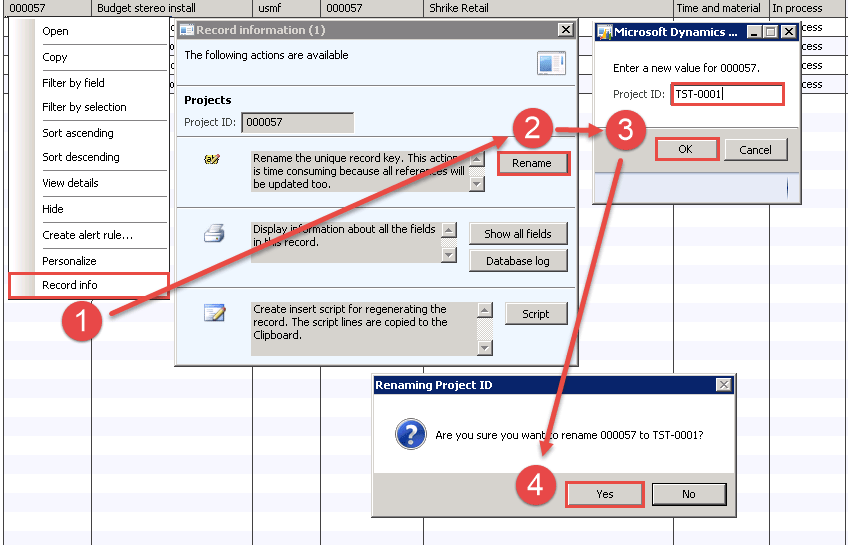
To change primary key in Dynamics AX 2012 you need to select record, right click on it and select Record info. In Record information form click Rename button, write new ID and click OK. System will ask if you are sure to rename from old to new ID – click Yes. After that system will try to change that key and if there will be no issues it will do it.
Developer perspective
To include table in automated key change it needs to be directly related. This means it has to have:
Relations
- In AOT on table in Relations node needs to be added relation to master table on primary key.
- Relation must have property Validate set to Yes.
EDT
- EDT used needs to have relation or reference to primary key on master table.
- Table must use the same or extended EDT like primary key in master table.
- Field need to have property IgnoreEDTRelation set to No.
To include additional not directly related table you need to overwrite renamePrimaryKey method. Below is example code for that in ProjTable – to make it shorter I removed standard code from that method:
server void renamePrimaryKey(boolean psaIncluedeSubProjects = true)
{
ProjTable originalRecord;
VendInvoiceInfoLine_Project vendInvoiceInfoLine_Project_group;
VendInvoiceInfoLine_Project vendInvoiceInfoLine_Project;
ttsBegin;
originalRecord = this.orig();
while select crossCompany vendInvoiceInfoLine_Project_group
group by DataAreaId
where vendInvoiceInfoLine_Project_group.ProjDataAreaId == this.dataAreaId
&& vendInvoiceInfoLine_Project_group.ProjId == originalRecord.ProjId
{
changeCompany(vendInvoiceInfoLine_Project_group.dataAreaId)
{
update_recordSet vendInvoiceInfoLine_Project
setting ProjId = this.ProjId
where vendInvoiceInfoLine_Project_group.ProjDataAreaId == this.dataAreaId
&& vendInvoiceInfoLine_Project_group.ProjId == originalRecord.ProjId;
}
}
super();
DimensionStorage::syncRenamedValue(this, originalRecord);
ttsCommit;
}
If the specific table is used in dimensions then it is really important to also update them. We can do this calling method DimensionStorage::syncRenamedValue(this, originalRecord).
See more

AGA pomaga – poznaj inteligentnego asystenta do przetwarzania zapytań ofertowych: ANEGIS Generative Assistant


Jak z pomocą narzędzi Power Platform, Microsoft Fabric i AI zrealizować plan na cyfrową transformację? ANEGIS Power Center

Obowiązkowy KSeF startuje za 4 miesiące! Umów się na bezpłatne konsultacje i przygotuj swój system na zmiany
Let's talk about your project
Let us know what you need: implementation, migration, system development, or a question you’re looking to have answered. We’ll get back to you with a concrete proposal for the next step - not a sales pitch.




