

Table browser form enhancement in AOT

This is a view for any table data but often there are tables with many fields and finding and positioning to the wanted field to see the value could be exhaustive task which involves a lot of scrolling. There is also the out of box possibility to use a field list select statement in the SQL pane on the table browser form but what the execution in this pane does is just to null the values in the non-selected columns and is not positioning to the selected column. So there is a solution to extend the table browser with a tree view pane which from which any field could be selected and positioned no matter of how many fields or what kind of data is in the table itself. This solution was originally created from Ruslan Goncharov for Dynamics AX 4.0, which was working until Dynamics AX 2009. The changes in Dynamics AX 2012 in the table browser are that the field list alphabetical ordering does not correspond with the sequence of the table field Id’s. So in the order the same solution to work in Dynamics AX 2012 we need some sorting of the pairs of table field id with field name. For this cause we will use the quicksort algorithm from one of my previous articles.
The changes in the form SysTableBrowser step by step are:
Step 1
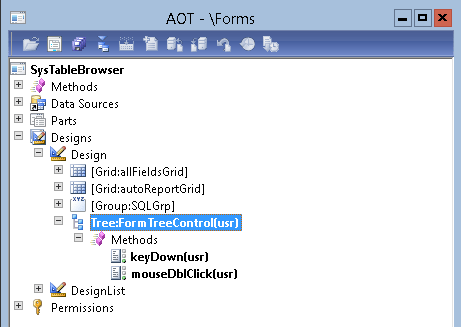
Add a tree control to the table browser form and name it ‘FormTreeControl’:
Step 2
Override the methods keyDown and mouseDblClick as follows:
public boolean keyDown(int _vKey, boolean _Ctrl, boolean _Shift)
{
TreeItemIdx itemIdx;
boolean ret;
#KeyPressed
ret = super(_vKey, _Ctrl, _Shift);
if((_formGridControl)&&(_vKey == #space))
{
itemIdx = FormTreeControl.getSelection();
_formGridControl.controlNum( conFind(itemIdxContainer, itemIdx ) ).setFocus();
}
return ret;
}
And
public int mouseDblClick(int _x, int _y, int _button, boolean _Ctrl, boolean _Shift)
{
TreeItemIdx itemIdx;
int ret;
;
ret = super(_x, _y, _button, _Ctrl, _Shift);
if((_formGridControl))
{
itemIdx = FormTreeControl.getSelection();
_formGridControl.controlNum( conFind(itemIdxContainer, itemIdx ) ).setFocus();
}
return ret;
}
Step 3
Add the following variables in the class declaration:
Container itemIdxContainer, conNew;
FormGridControl _formGridControl;
Step 4
Create a quicksort method that will sort pairs of values:
protected container conQuickSort(container _conSort)
{
container conLess = conNull(), conGreater = conNull();
str pivotName;
int pivotId, pivotIdx, i;
;
// Check for null array
if (conLen(_conSort) <= 2)
return _conSort;
// Select pivot value and remove it from the container
pivotIdx = conLen(_conSort)/2 + ((conLen(_conSort)/2) mod 2);
pivotName = conPeek(_conSort, pivotIdx);
pivotId = conPeek(_conSort, pivotIdx-1);
_conSort = conDel(_conSort, pivotIdx-1,2);
// Partinioning of the main array
for (i = 1; i <= conLen(_conSort); i=i+2)
{
if (conPeek(_conSort, i+(i mod 2)) <= pivotName)
{
conLess += conPeek(_conSort, i+(i mod 2)-1);
conLess += conPeek(_conSort, i+(i mod 2));
}
else
{
conGreater += conPeek(_conSort, i+(i mod 2)-1);
conGreater += conPeek(_conSort, i+(i mod 2));
}
}
// Recursive call
return (this.conQuickSort(conLess) + pivotId + pivotName + this.conQuickSort(conGreater));
}
Step 5
Create the method that will fill the tree control:
void fillTree()
{
int _i;
FormDesign Ctrl = element.design();
FormControl _buildCtrl;
FormControl _formControl;
TreeItemIdx treeItemIdx;
ImageListAppl_Aot ImageListAppl_Aot;
DictField dictField;
fieldId fieldId;
int i,j,k;
int fieldCnt;
#DictField
#resAppl
ImageRes findOverlayImage(Types _type)
{
ImageRes imageRes;
switch(_type)
{
case Types::STRING, Types::VARSTRING :
return #ImageOverlayString;
case Types::ENUM:
return #ImageOverlayEnum;
case Types::REAL:
return #ImageOverlayReal;
case Types::DATE:
return #ImageOverlayDate;
case Types::INTEGER:
return #ImageOverlayInteger;
case Types::UtcDateTime:
return #ImageOverlayDate;
case Types::CONTAINER:
return #ImageOverlayContainer;
default:
return 0;
}
return imageRes;
}
;
// Find 'Grid' object -->
for(_i=1; _i<=Ctrl.controlCount(); _i++)
{
_buildCtrl = Ctrl.controlNum(_i);
_formControl = element.control(_buildCtrl.id());
if(_formControl.name() == 'allFieldsGrid')
{
_formGridControl = _formControl;
}
}
// Find 'Grid' object <--
// Fill tree -->
if((FormTreeControl.visible())&&(dictTable))
{
ImageListAppl_Aot = new ImageListAppl_Aot();
formTreeControl.setImagelist(ImageListAppl_Aot.imageList());
formTreeControl.deleteAll();
fieldCnt = dictTable.fieldCnt();
for (i=1; i<=fieldCnt; i++)
{
fieldId = dictTable.fieldCnt2Id(i);
dictField = new DictField(dictTable.id(), fieldId);
if (bitTest(dictField.flags(), #DBF_STORE) && !dictField.isSystem())
{
for(j = 1;j <= dictField.arraySize(); j++)
{
treeItemIdx = SysFormTreeControl::addTreeItem(formTreeControl, dictField.name(), 0, null, imageListAppl_Aot.image(#ImageField));
SysFormTreeControl::setOverlayImage(formTreeControl, treeItemIdx, imageListAppl_Aot.image(findOverlayImage(dictField.baseType())));
itemIdxContainer += [treeItemIdx, dictField.name()];
}
}
}
SysFormTreeControl::expandTree(formTreeControl, formTreeControl.getRoot(), 1);
// Do predefined design width more wider
element.design().width( element.design().widthValue()+FormTreeControl.widthValue() );
if(_formGridControl)
_formGridControl.topMode(FormTop::TopEdge);
}
// Fill tree <--
// Sort container and leave only ids
conNew = this.conQuickSort(itemIdxContainer);
itemIdxContainer = conNew;
for (k = 1; k <= conLen(itemIdxContainer); k++)
{
if (typeOf(conPeek(itemIdxContainer,k)) == Types::String)
itemIdxContainer = conDel(itemIdxContainer, k, 1);
}
// Sort container <--
}
Step 6
Call the fillTree method in the existing run method:
void run()
{
super();
dictTable = new DictTable(tableId);
this.parmSQLStmt('SELECT * FROM '+tableid2name(tableId));
this.fillTree();
}
Step 7
The final step is to add handling for key stroke events when you are positioned on the tree. I’ve added possibility to select the particular field with Enter key stroke and Space key as well. In order to achieve this the Task method in table browser should modified as follows:
int task(int p1)
{
TreeItemIdx itemIdx;
#Task
FormControl cur = element.selectedControl();
int ret;
if ((p1 == #taskTab) && (cur.hWnd() == SQL.hWnd()))
{
SQL.pasteText(' ', true);
SQL.updateWindow();
ret = 0;
}
else if (p1 == #taskf5)
{
ExecuteSQL.clicked();
ret = 1;
}
else if (p1 == #taskEnter)
{
if(_formGridControl)
{
itemIdx = FormTreeControl.getSelection();
_formGridControl.controlNum( conFind(itemIdxContainer, itemIdx ) ).setFocus();
}
}
else
ret = super(p1);
return ret;
}
Step 8
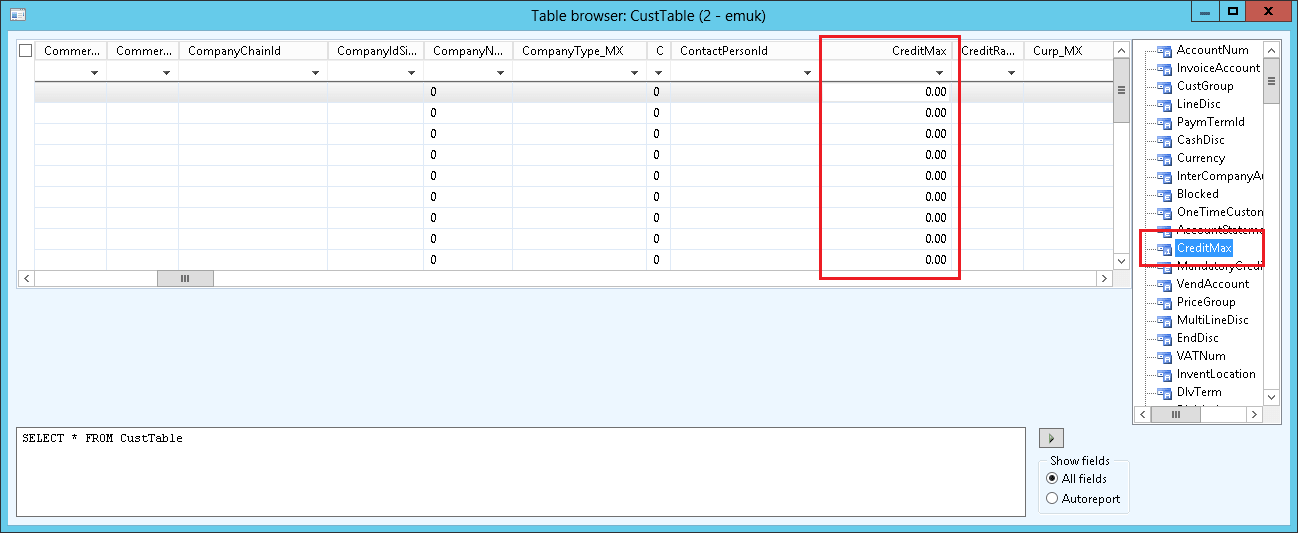
So finally you can enjoy your enhanced table browser with just typing the name of the field in the tree view pane and hitting Enter or Space or Double click:
Happy DAXing.
See more

AGA pomaga – poznaj inteligentnego asystenta do przetwarzania zapytań ofertowych: ANEGIS Generative Assistant


Jak z pomocą narzędzi Power Platform, Microsoft Fabric i AI zrealizować plan na cyfrową transformację? ANEGIS Power Center

Obowiązkowy KSeF startuje za 4 miesiące! Umów się na bezpłatne konsultacje i przygotuj swój system na zmiany
Let's talk about your project
Let us know what you need: implementation, migration, system development, or a question you’re looking to have answered. We’ll get back to you with a concrete proposal for the next step - not a sales pitch.




