
Union view basics and common issues in AX 2012

IDynamics AX 2012 views enables you to use the power of SQL Server more efficiently than simply creating complex queries from the code.
Let’s imagine a situation where you want to combine data from multiple datasources. To achieve that you can use union views.
First you must create Union Query. When you do that you must remember about few things:
- Number of columns and their type must be the same on each datasource,
- There is no conversion between types (neither explicit nor implicit),
- You cannot use union query to update records,
- Field names that union query uses are taken from the first datasource.
For each datasource except the first one you will have the possibility to select UnionType, which is basically asking you if you want to have duplicates (UnionAll) or not (Union).
For the sake of demonstration I created two tables with one field of type string and one of type integer (which I will not use) and then created following query of QueryTypeUnion.

Next step I created a view and drag and dropped Query1 into it.
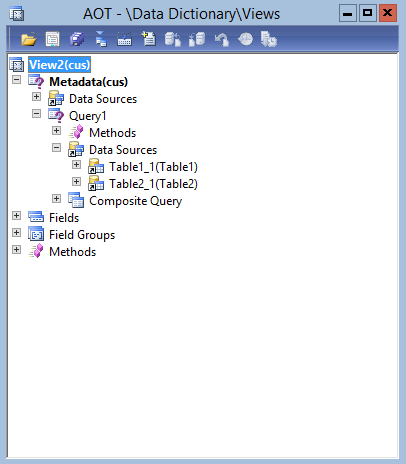
Next step is to select wanted fields from datasrouce Table1_1 into the (View2 -> Fields), if you for some reasons forget to do this you will have the following error:
“You are not authorised to access table ‘View2’ (View2). Contact your system administrator.”
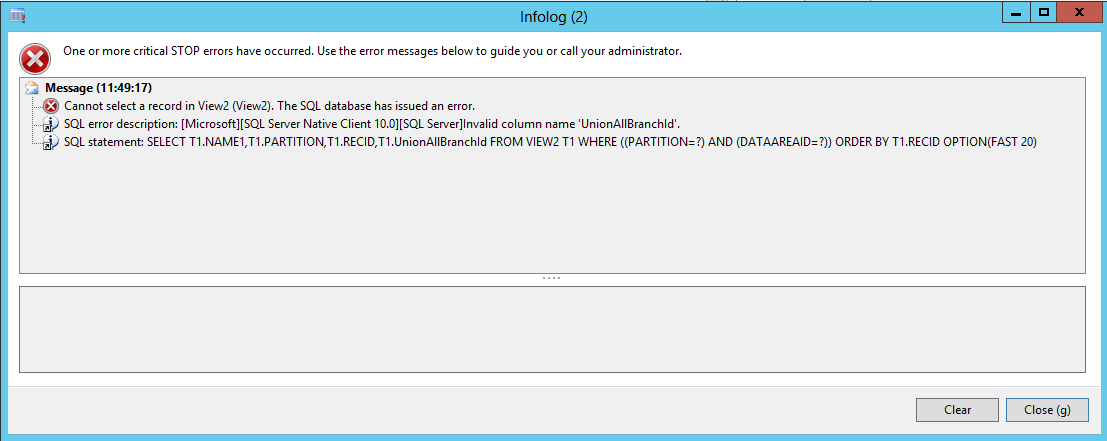
Another issue that you might stumble across is when there is a mismatch between UnionType on datasource of the view and on the union query used or there are different QueryTypes on different datasources.
“Invalid column name 'UnionAllBranchId'.”
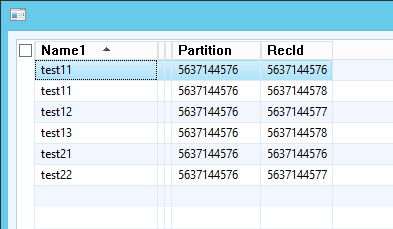
If everything was created fine and there are no errors, you can use your view in the system just like a regular table.
See more

AGA pomaga – poznaj inteligentnego asystenta do przetwarzania zapytań ofertowych: ANEGIS Generative Assistant


Jak z pomocą narzędzi Power Platform, Microsoft Fabric i AI zrealizować plan na cyfrową transformację? ANEGIS Power Center

Obowiązkowy KSeF startuje za 4 miesiące! Umów się na bezpłatne konsultacje i przygotuj swój system na zmiany
Let's talk about your project
Let us know what you need: implementation, migration, system development, or a question you’re looking to have answered. We’ll get back to you with a concrete proposal for the next step - not a sales pitch.




